What Important Information Is Available on a Pay Stub?
Most people look at one number on their pay stub — the net pay at the bottom — confirm it matches their bank deposit, and move on. Everything else on the page gets ignored.
That's a mistake. Your pay stub contains a surprising amount of important financial information, and some of it can save you real money or headaches if you actually pay attention to it.
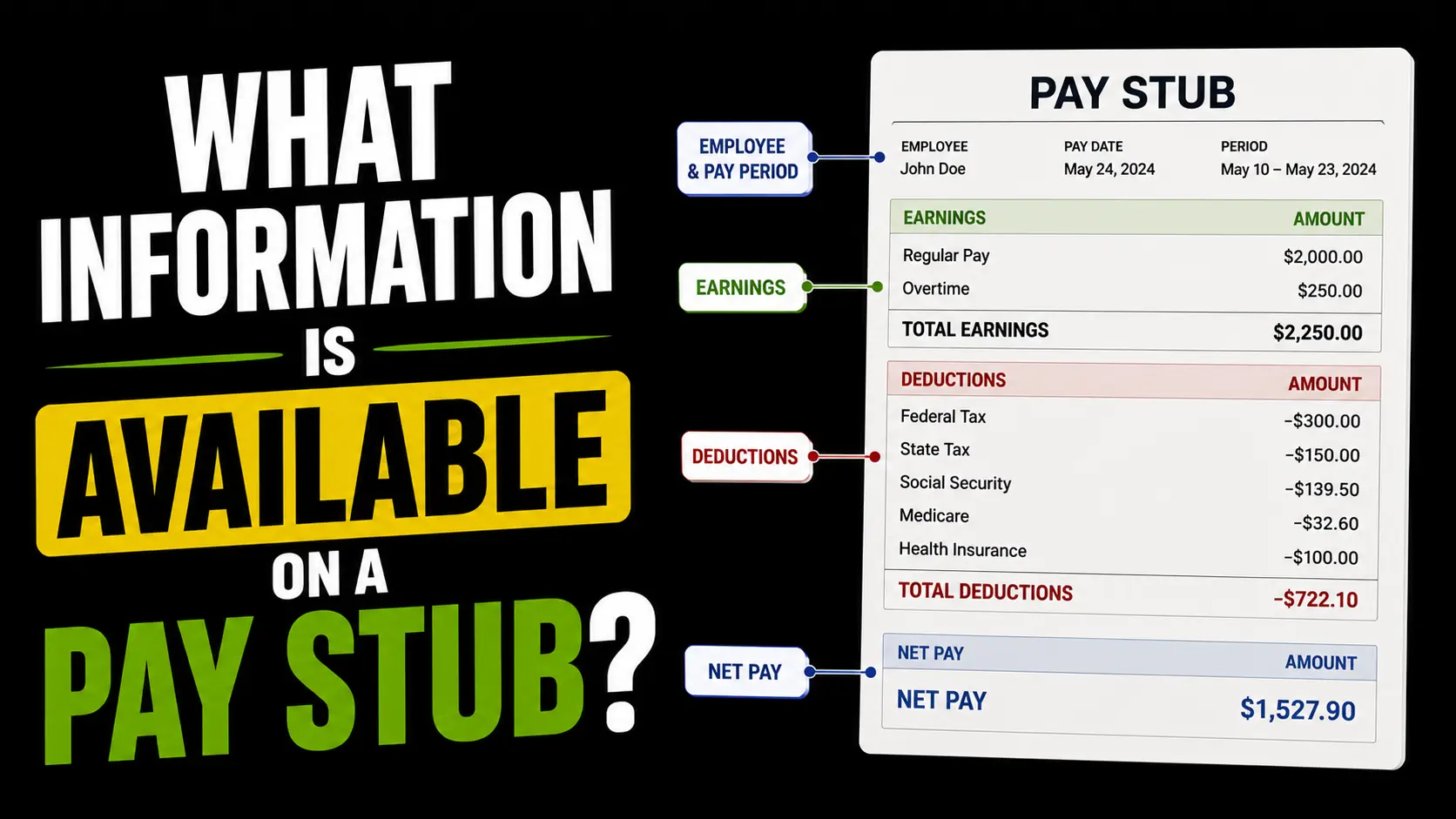
Your Personal and Employment Information
Every pay stub starts with basic identifying information — your name, your employer's name and address, and often your employee ID number. Some pay stubs also show a partially masked version of your Social Security number for identification purposes.
This seems obvious, but it's worth checking, especially when you start a new job. Errors in your name or Social Security number in a payroll system can cause real problems come tax season — your W-2 needs to match exactly what the IRS has on file for you.
Pay Period Dates
Your pay stub shows two date-related pieces of information: the pay period and the pay date.
The pay period is the actual window of time you worked — for example, July 1 through July 15. The pay date is when the money hits your account, which is usually several days after the pay period ends. These two dates are always different and that's completely normal.
Knowing your pay period dates matters when you're disputing a discrepancy. If you worked overtime on July 14th and it's not showing up, the first thing to check is whether that date falls within the pay period on your stub.
Gross Pay
Gross pay is your total earnings for the pay period before anything is taken out. For salaried employees, it's your annual salary divided by your number of pay periods. For hourly workers, it's your hours worked multiplied by your hourly rate.
If you worked overtime, it shows up as a separate line item in the earnings section — typically at 1.5 times your regular rate. Always verify this line is correct if you worked extra hours, because overtime calculation errors are one of the most common payroll mistakes.
The gross pay section is also where you'd see bonuses, commissions, or any additional compensation paid during that period, each listed as its own line.
Federal and State Tax Withholding
This section shows exactly how much was withheld from your paycheck for federal income tax and state income tax. The amounts here are based on your salary, your filing status, and the information you provided on your W-4 when you started the job.
These numbers matter beyond just understanding your paycheck. If your federal withholding looks unusually low or high compared to what you'd expect, it could mean your W-4 was set up incorrectly — which would result in either owing money or getting a large refund when you file your taxes. Neither is ideal. A large refund sounds nice but it means you overpaid throughout the year and gave the government an interest-free loan of your own money.
If you live in a state with no income tax — Texas, Florida, Nevada, and Washington among them — the state tax line will show zero or won't appear at all. That's not a mistake, it's just how those states work. For a full breakdown of how these numbers are calculated, the paycheck calculator shows the exact federal and state tax on any salary.
FICA Taxes: Social Security and Medicare
FICA stands for the Federal Insurance Contributions Act, and it covers two separate taxes that appear on every pay stub regardless of your income level or filing status.
Social Security takes 6.2% of your gross wages up to the 2026 wage base of $184,500. Medicare takes 1.45% with no cap at all. Together they add up to 7.65% of every paycheck, every pay period, no exceptions for most workers.
These lines sometimes show up under different names on older payroll systems — Social Security might be labeled OASDI, and Medicare might appear as Fed MED/EE. They're the same taxes regardless of the label.
Voluntary Deductions
Below the mandatory taxes, most pay stubs have a separate section for deductions you opted into during benefits enrollment. These typically include health insurance premiums, dental and vision coverage, 401(k) or 403(b) retirement contributions, HSA or FSA contributions, and life or disability insurance if you enrolled.
This section is where pay stub errors tend to hide. Common problems include a 401(k) contribution that stopped being deducted after a payroll system update, a health insurance premium that jumped at annual renewal without you realizing, or a deduction for a benefit you never actually enrolled in.
It's worth scanning this section every few pay periods, not just when something feels off. The sooner you catch an error, the easier it is to get it fixed — payroll corrections become progressively more complicated the longer they go unaddressed.
Net Pay
Net pay is what's left after everything above has been subtracted from your gross pay. It's the number that matches your bank deposit, and it's the number most people use as their mental "paycheck amount."
The gap between gross pay and net pay surprises a lot of people when they start a new job. On a $65,000 salary, your gross biweekly paycheck is $2,500. Your actual take-home after federal taxes, FICA, and a few common deductions might be closer to $1,800. Understanding why your paycheck is less than your salary makes that gap a lot less alarming.
Year-to-Date Totals
Most pay stubs include a YTD column alongside the current period column. YTD stands for year-to-date and shows the running total of every figure — gross earnings, each tax withheld, each deduction — since January 1st of the current year.
The YTD column is genuinely useful at tax time. Your W-2 should match your final pay stub's YTD figures almost exactly. If they don't match, that's a payroll error worth investigating before you file your taxes.
YTD totals are also how you track whether you've hit the Social Security wage base for the year. Once your YTD earnings reach $184,500 in 2026, Social Security withholding stops for the rest of the year — your paycheck will actually get slightly larger at that point.
Employer Contributions
Some pay stubs also show what your employer is contributing on your behalf — their matching portion of your 401(k), their share of your health insurance premium, their half of FICA taxes. This information doesn't affect your net pay since it's money your employer pays separately, but it gives you a clearer picture of your total compensation package.
Most people dramatically underestimate how much their employer spends on them beyond their salary. If your employer is matching 4% of your salary into your 401(k) and covering $800 a month of your health insurance, that's real compensation even though none of it shows up in your bank account.